
I2C vs SPI vs UART: Which Communication Protocol Should You Use?
- Amisha Patil
- 2 days ago
- 3 min read

Introduction
If you've ever worked on an embedded system or IoT project, you've almost certainly come across three names: I2C, SPI, and UART. These are the three most widely used communication protocols in the embedded world and choosing the right one can make a big difference in how your project performs.
But for many engineers, the choice isn't always obvious. Each protocol has its own strengths, weaknesses, and ideal use cases. In this post, we'll break down all three in a clear, practical way so you can make the right call for your next project.
What is a Communication Protocol?
Before diving in, let's quickly recap. A communication protocol is a set of rules that defines how two or more devices exchange data. In embedded systems, your microcontroller often needs to talk to sensors, displays, memory chips, or other peripherals and it does so through these protocols.
UART: Universal Asynchronous Receiver Transmitter
How It Works
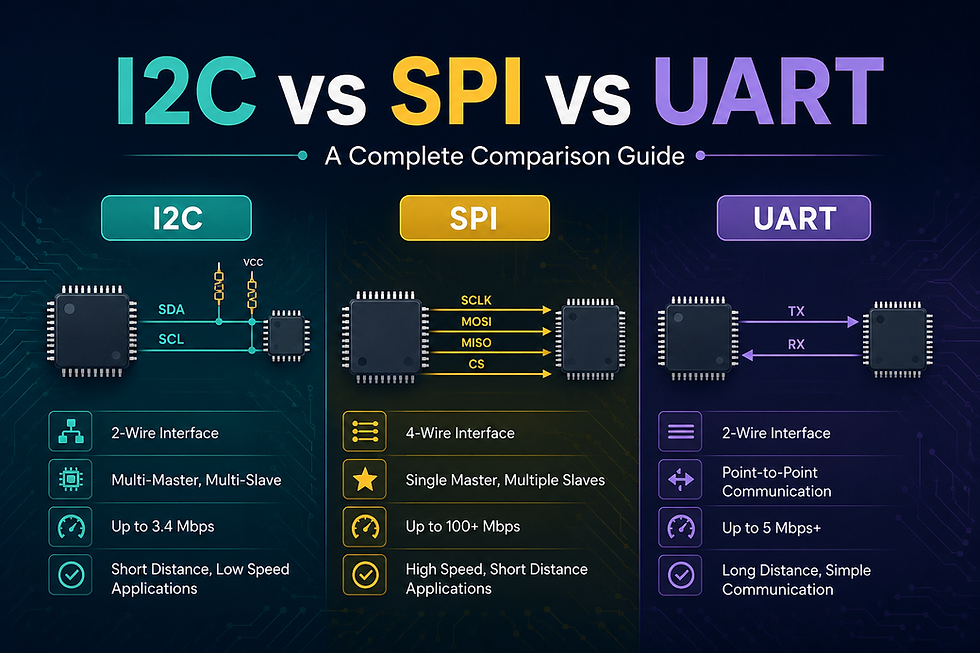
UART is one of the oldest and simplest protocols. It uses just two wires, TX (transmit) and RX (receive) and sends data bit by bit asynchronously, meaning there's no shared clock signal between devices.
Key Features
Wires needed: 2 (TX, RX)
Speed: Typically up to 115200 baud (can go higher)
Devices supported: Point-to-point only (1 to 1)
Clock: No shared clock (asynchronous)
When to Use UART
Debugging and logging via a serial terminal
GPS modules, Bluetooth modules (HC-05), GSM modules
Simple point-to-point communication between two devices
When simplicity matters more than speed
Pros
✅ Very simple to implement
✅ Minimal hardware required
✅ Great for debugging
Cons
❌ Only supports two devices (no multi-device bus)
❌ Both sides must agree on the same baud rate
❌ Slower compared to SPI

SPI: Serial Peripheral Interface
How It Works
SPI is a synchronous protocol that uses a shared clock line. It communicates over four wires: MOSI (Master Out Slave In), MISO (Master In Slave Out), SCLK (Clock), and CS/SS (Chip Select). One device acts as the master and controls the clock.
Key Features
Wires needed: 4 (+ 1 CS per additional device)
Speed: Very fast up to tens of MHz
Devices supported: One master, multiple slaves
Clock: Shared clock (synchronous)
When to Use SPI
High-speed data transfer (displays, ADCs, DACs)
SD cards and Flash memory
When low latency is critical
Short-distance communication on the same PCB
Pros
✅ Very fast data transfer
✅ Full-duplex (send and receive simultaneously)
✅ Simple protocol logic
Cons
❌ More wires needed (especially with multiple slaves)
❌ No built-in acknowledgment mechanism
❌ Not ideal for long-distance communication

I2C: Inter-Integrated Circuit
How It Works
I2C uses just two wires, SDA (data) and SCL (clock), and supports multiple devices on the same bus using unique addresses. It is a synchronous protocol with a master-slave architecture.
Key Features
Wires needed: 2 (SDA, SCL)
Speed: Standard 100 kHz, Fast 400 kHz, High-speed 3.4 MHz
Devices supported: Multiple masters and slaves on the same bus
Clock: Shared clock (synchronous)
When to Use I2C
Connecting multiple sensors to one microcontroller (temperature, humidity, IMU)
OLED displays, EEPROMs, RTC modules
When you have limited GPIO pins
When moderate speed is acceptable
Pros
✅ Only 2 wires for many devices
✅ Supports multiple devices on a single bus
✅ Built-in acknowledgment (ACK/NACK)
Cons
❌ Slower than SPI
❌ Pull-up resistors required
❌ Address conflicts possible with multiple similar devices
Side-by-Side Comparison
Feature | UART | SPI | I2C |
Wires | 2 | 4+ | 2 |
Speed | Medium | High | Low–Medium |
No. of Devices | 2 (point-to-point) | 1 master, many slaves | Many masters & slaves |
Clock Type | Asynchronous | Synchronous | Synchronous |
Complexity | Low | Medium | Medium |
Best For | Debugging, modules | High-speed peripherals | Multiple sensors |
How to Choose the Right One?
Here's a simple decision guide:
Need to debug or talk to a wireless module? → Go with UART
Need high-speed data transfer (display, memory)? → Go with SPI
Need to connect multiple sensors with fewer wires? → Go with I2C
In many real-world projects, you'll end up using all three on the same board each serving a different purpose.
Conclusion
There's no single "best" protocol it all depends on your project's requirements. UART keeps things simple, SPI keeps things fast, and I2C keeps your wiring clean when juggling multiple devices. Understanding the trade-offs gives you the confidence to design better, more efficient embedded systems.
The next time you pick up a datasheet and see I2C, SPI, or UART, you'll know exactly what you're working with and more importantly, why.


Comments